An AI chatbot without training content relies solely on its general knowledge to answer questions. While modern AI models know a great deal, they know nothing about your specific products, services, pricing, policies, or procedures. Training your chatbot on your own content transforms it from a generic assistant into a knowledgeable representative of your business. Below we walk through what content types are supported, how to add training material, how the system processes your content, and best practices for getting accurate, reliable answers.
How Training Works
Social Intents uses a technique called Retrieval-Augmented Generation (RAG) to train your chatbot. Here is what happens behind the scenes:
This means the AI does not memorize your content - it retrieves relevant pieces in real time for each question. This ensures responses are always based on the most current training data and that only relevant content is used for each answer.
Supported Content Types
Social Intents supports multiple content formats for training. Each has its own strengths:
| Content Type | File Extension | Best For |
|---|---|---|
| Website URLs | N/A (crawled) | Product pages, FAQ pages, knowledge base articles, pricing pages |
| PDF documents | User guides, whitepapers, policy documents, product manuals | |
| Word documents | .docx | Internal documentation, support guides, onboarding materials |
| Excel spreadsheets | .xlsx | Product catalogs, pricing tables, feature comparison matrices |
| CSV files | .csv | FAQ lists, product data, structured Q&A pairs |
| Custom Q&A pairs | N/A (manual) | Specific questions with exact answers you want to control |
Adding Training Content
Accessing the Training Interface
Training with Website URLs
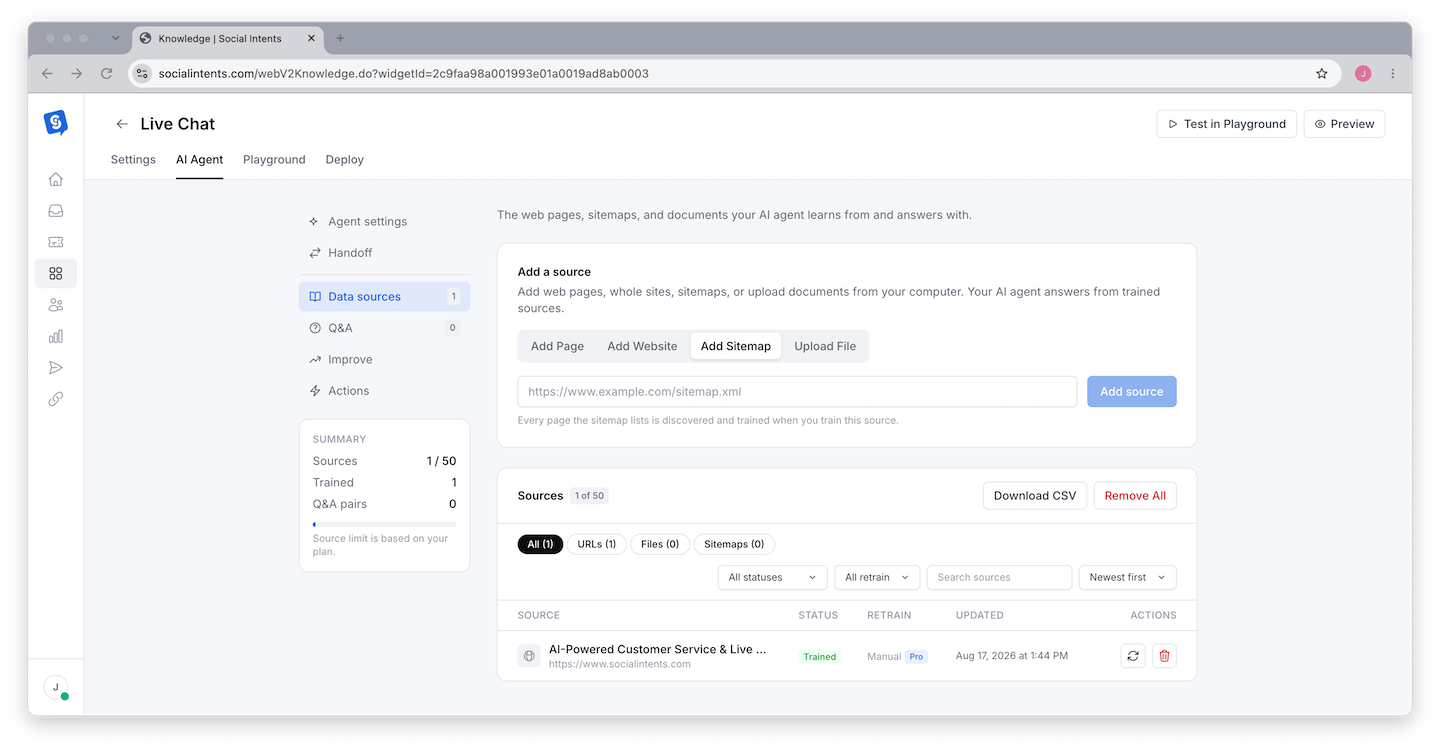
Adding URLs is the fastest way to train your chatbot on existing content. The system crawls each URL, extracts the text content, and processes it into your knowledge base.
Tips for URL training:
- Add your most important pages first - pricing, features, FAQ, and getting started guides
- Each URL is processed independently. Add individual page URLs rather than expecting the system to crawl an entire site automatically.
- Pages behind login walls or that block bots may not be crawlable
- Clean, text-heavy pages train better than image-heavy pages with little text
Training with Documents
Upload files directly to build your knowledge base from existing materials.
Document preparation tips:
- PDFs - Text-based PDFs work best. Scanned image PDFs have limited text extraction accuracy. If possible, use PDFs that were generated from text (not scanned paper documents).
- Word documents - Well-structured documents with headers and paragraphs train better than unformatted text walls.
- Excel files - Use clear column headers. Each row is processed as a separate data item.
- CSV files - Include header rows. Structure data as question/answer pairs or category/content pairs for best results.
Training with Custom Q&A Pairs
Custom Q&A pairs give you the most control over specific answers. When a visitor asks a question that closely matches one of your Q&A pairs, the chatbot uses your exact answer.
This is ideal for:
- Questions that require precise, exact answers (return policies, SLAs, pricing details)
- Frequently asked questions where you want consistent responses
- Correcting answers the chatbot gets wrong from other training content
Content Strategy for Training
What to Train On
Prioritize content that your visitors actually ask about. Here is a recommended order:
| Priority | Content Type | Why |
|---|---|---|
| 1 | FAQ and help documentation | Directly answers the questions visitors are most likely to ask |
| 2 | Product/service descriptions | Helps the chatbot explain what you offer |
| 3 | Pricing and plans | One of the most common visitor questions |
| 4 | Getting started guides | Helps new users and prospects understand your product |
| 5 | Policy documents | Ensures accurate answers about returns, SLAs, privacy, etc. |
| 6 | Troubleshooting guides | Helps the chatbot resolve common support issues |
| 7 | Blog content | Provides depth on specific topics and use cases |
What NOT to Train On
- Internal-only documents - Employee handbooks, internal memos, confidential pricing strategies. The chatbot could expose this information to visitors.
- Outdated content - Old pricing pages, deprecated feature docs, and obsolete guides. They cause the chatbot to give incorrect answers.
- Competitor comparisons - Unless you want the chatbot discussing competitors, avoid training on competitor analysis documents.
- Extremely long documents - A 500-page user manual is less effective than targeted sections. Break large documents into focused smaller pieces.
Article Display Modes
Social Intents offers several options for how training content sources are displayed alongside the chatbot's response. This is controlled by the Content Display setting in your AI Chatbot Settings tab:
| Mode | What Visitors See | Best For |
|---|---|---|
| Hide Articles | Only the AI-generated response. No source references. | Clean, simple chat experience |
| Refer to Article URLs | Links to the source articles/pages used in the answer. | Driving visitors to your documentation |
| Show Best Match Source | The single most relevant source excerpt. | Providing evidence without overwhelming |
| Show Top Sources | The top matching source excerpts. | Transparency about where answers come from |
| Show Top with Score | Top sources with relevance scores. | Internal testing to evaluate answer quality |
| Show All, Include Uploaded Files | All matched sources including uploaded documents. | Maximum transparency, debugging |
Retraining and Updating Content
Your business evolves - products change, pricing updates, new features launch. Your chatbot's training data needs to keep up.
When to Retrain
- You update your website pages that the chatbot was trained on
- You release new products or features
- Your pricing or plans change
- You notice the chatbot giving outdated information
- Your policies change (returns, SLAs, privacy)
How to Retrain
Return to the training interface and re-add the updated URLs or re-upload the updated documents. The system processes the new content and updates the embeddings in the vector database. Old embeddings from the previous version of the same content are replaced.
Automatic Retraining (Pro Plans and Above)
On Pro plans and above, Social Intents can automatically retrain your chatbot on a schedule. The system re-crawls your trained URLs and reprocesses the content to keep your knowledge base current without manual intervention.
Available schedules:
- Daily - Best for websites with frequent content changes (e.g., ecommerce pricing, news, inventory-driven pages)
- Weekly - Best for most businesses where content changes regularly but not daily
- Monthly - Best for stable content that changes infrequently (e.g., policy docs, established product pages)
Configure automatic retraining in your widget's AI Chatbot Settings tab. Select the retraining frequency from the dropdown. When enabled, the system automatically re-crawls all trained URLs on the selected schedule and updates the embeddings with the latest content.
Troubleshooting Training Issues
Chatbot Gives Incorrect Answers
If the chatbot responds with wrong information:
- Check whether the source content is correct. The chatbot can only be as accurate as the content it was trained on.
- Add a custom Q&A pair with the correct answer for that specific question. Q&A pairs take priority over general training content.
- Update your system instructions with a rule about the specific topic.
Chatbot Says "I Don't Know" Too Often
If the chatbot cannot answer questions that it should know:
- Your training content may not cover that topic yet. Add the relevant pages or documents.
- The question may be phrased differently from your content. Add custom Q&A pairs using the exact phrasing visitors use.
- The content may be too dense or poorly formatted. Break it into clearer, more targeted sections.
Chatbot Mixes Up Information
If the chatbot combines information from different topics incorrectly:
- Review your training content for ambiguous or overlapping information
- Separate distinct topics into separate training articles rather than one long document
- Add system instructions that tell the chatbot to be careful about distinguishing between related but different topics
URL Crawling Fails
If a URL cannot be processed:
- Make sure the URL is publicly accessible (not behind authentication)
- Check that the page does not block bots via robots.txt or meta tags
- Try copying the page content into a document and uploading it instead
Training Content Limits
The number of training articles and content items available depends on your Social Intents plan. Higher-tier plans allow more training content, which means broader chatbot knowledge. Check your plan details for specific content limits.
The number of articles referenced per response also varies - typically 3 to 6 article chunks are retrieved per visitor question, depending on your account tier. This means each response draws from the most relevant pieces of your training data rather than trying to include everything.
Best Practices Summary
- Start with your FAQ - This is the highest-impact content for most chatbots
- Use custom Q&A for critical answers - When exact wording matters, Q&A pairs give you complete control
- Keep content current - Retrain whenever important pages change
- Test after training - Ask the chatbot the questions you expect visitors to ask and verify the answers
- Use article display modes - Let visitors see where answers come from to build trust
- Quality over quantity - Ten well-written, focused pages train better than one hundred poorly organized ones
- Combine with system instructions - Training provides the knowledge; system instructions tell the chatbot how to use it
Frequently Asked Questions
Can I train the chatbot on my entire website?
You can train on multiple URLs from your website, but you add them individually. There is no automatic full-site crawl. Focus on the most important and most frequently referenced pages for the best results.
How long does training take?
Each URL or document typically processes within seconds to a couple of minutes, depending on the content size. Large PDFs with hundreds of pages may take longer. You can continue using the chatbot while new content is being processed.
Does training content affect AI engine costs?
Yes, indirectly. When the chatbot retrieves training content for a response, the retrieved content is included as context in the AI request, which adds to the token count. However, this overhead is typically modest and the improvement in response quality far outweighs the small additional cost.
Can I see what content the chatbot used to generate an answer?
Yes. Set the Content Display mode to "Show Top Sources" or "Show Top with Score" to see which training content chunks were used for each response. This is invaluable for debugging and improving your training data.
Is my training content shared with other users?
No. Your training content is stored separately and is only accessible to your chatbot. It is not shared with other Social Intents customers or used to train the underlying AI models.
Can I remove training content?
Yes. You can remove individual training items (URLs, documents, Q&A pairs) from the training interface. The associated embeddings are removed from the vector database and the chatbot will no longer reference that content in its responses going forward.